
A tech gift can look thoughtful because it is new, clever, or full of features. Yet the device only becomes useful when it fits the recipient’s existing equipment, daily rhythm, patience with setup, and comfort with accounts, data, and notifications.
The better question is not whether the technology is impressive. It is whether it removes one repeated difficulty without creating a larger system to learn and maintain. This guide is part of the Gifting collection, where the recipient’s real life matters more than the novelty of the product.
- Solve a problem the recipient already notices
- Work with the devices and accounts they use
- Remain manageable after the first setup
- Respect privacy and the right to turn it off
The broader guide to thoughtful gift ideas begins with observation. That principle matters even more with technology because the wrong connector, platform, subscription, or account can make an otherwise appealing gift unusable.
Name the Friction Before Looking at Features
Start with the moment that keeps causing inconvenience. Features matter only after the problem is clear enough to describe without naming a product.
-
Notice the repeated problem
Look for something that happens often: several devices competing for outlets, family plans being missed, photographs remaining on one person’s phone, or a household task repeatedly taking more effort than expected.
-
Check the current workaround
The recipient may already have a simple method they understand and prefer. A new device should improve that routine rather than replace it merely because another method looks more modern.
-
Count how often it happens
A small difficulty that appears every day may justify a tool. Something that occurs twice a year may not deserve permanent space, another charger, and an account.
-
Identify the future maintenance
Decide who will install updates, reset passwords, replace parts, manage subscriptions, and troubleshoot when the device stops behaving as expected.
-
Confirm technology is necessary
A tray, printed label, ordinary lamp, paper calendar, or simple timer may solve the same problem with fewer steps.
The most dependable gifts that make everyday life easier reduce friction after the excitement of opening has passed.
Check the Ecosystem Before the Product
- Phone and operating system
Confirm which phone, watch, tablet, or computer the recipient currently uses and whether the accessory supports that exact generation.
Look forClearly named models and operating-system requirementsAvoidAssuming products from the same broad category work together - Charging standard
Wireless charging, magnetic alignment, cable types, power delivery, and included adapters vary between devices.
Look forThe charging method and power level required by each deviceAvoidRelying on shape or appearance as proof of compatibility - Case and accessory fit
A thick case, metal ring, watch band, stand, or camera bump may prevent a device from sitting correctly.
Look forEnough clearance for the recipient’s existing setupAvoidExpecting them to replace a case they already like - Regional requirements
Voltage, plug type, app availability, warranties, and subscriptions may differ between countries.
Look forSupport in the region where the device will actually be usedAvoidBuying from a market with incompatible power or unavailable services - Account ownership
The recipient should control the primary account, password, recovery options, and stored information.
Look forA setup that can be transferred fully to themAvoidLeaving the device permanently connected to the giver’s account
A charging stand makes compatibility visible because several devices may need to align with different surfaces at the same time. A phone that appears to fit may charge poorly through its case, while a watch may require a particular charging module or position.

Before choosing one, list the exact phone and watch models, the cases being used, the preferred bedside or desk location, and whether an appropriate wall adapter is included. The stand should reduce cable clutter without making overnight charging less reliable.
Compatibility is not a minor technical detail. It determines whether the gift can join the recipient’s daily life immediately or remain in its box while someone searches for another cable, adapter, case, or replacement device.
Decide How Much Setup Is Reasonable
A Convenient Control Panel May Still Need a Whole System
A wall-mounted smart-home panel can place lights, locks, alarms, cameras, or household routines in one visible location. That promise assumes the home already contains compatible equipment and that the people living there want those systems connected.
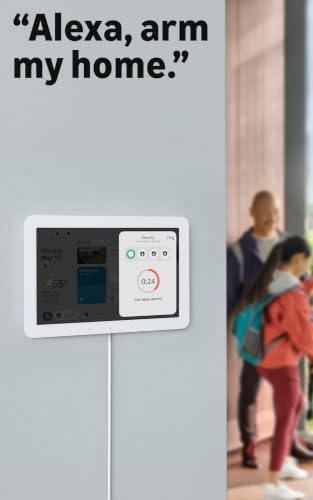
Setup may involve mounting, electrical power, Wi-Fi, app installation, account verification, device discovery, room names, voice profiles, household members, and decisions about who can arm or unlock what. A security-related control should never be added without the knowledge and agreement of the people who live in the home.
Decide who will own the main account and what happens if the giver is unavailable later. The recipient should not need to call the person who gave the gift every time a password expires, a router changes, or a household member needs access.
Maintenance Continues After the Device Learns the Home
A robot vacuum may reduce part of a repeated cleaning task, but it also introduces maps, charging docks, brushes, filters, dust bins, sensors, thresholds, cords, and objects that must be moved out of its path.
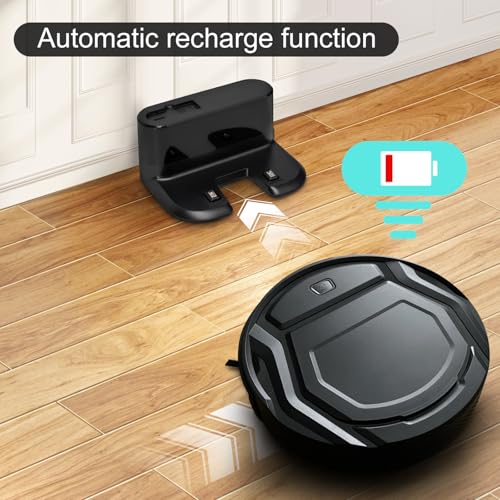
Look at the actual home rather than the demonstration image. Thick rugs, stairs, low furniture, pet bowls, loose cords, toys, and small thresholds may interrupt operation. Someone must also empty the bin, remove hair from the brush, clean sensors, and replace worn parts.
The device fits when that smaller maintenance routine is easier than the task it replaces. It does not fit when the recipient must reorganize the home each day, manage maps they do not want, or keep requesting help because the app is the only way to control basic functions.
Protect Privacy Without Making the Gift Feel Suspicious
-
Identify what is collected
Check whether the device handles photographs, audio, video, location, contacts, schedules, household activity, or usage history.
-
Find where the data is stored
Determine whether information remains on the device, moves to cloud storage, or is copied into an account controlled by the manufacturer.
-
Give the recipient account control
Use their email address, recovery method, password, and consent. Do not leave personal content attached permanently to the giver’s login.
-
Review sharing permissions
Confirm who can upload, view, download, delete, or forward photographs and other information.
-
Make stopping easy
The recipient should be able to disable uploads, notifications, microphones, cameras, or sharing without dismantling the whole setup.
-
Avoid surprise access
Do not retain remote viewing or administrative privileges merely because you helped install the device.
Connection feels lighter when the recipient keeps control over what enters the home, what is shared, and when the device becomes quiet.
A digital photo frame can help family moments cross distance, but the emotional value depends on more than image quality. The recipient needs to know who can send photographs, whether new images appear automatically, and whether anyone else can access the library.

Create the account in the recipient’s name whenever possible. Explain how invitations work, how to remove a contributor, how to delete an image, and what happens if the subscription or cloud service changes. Do not upload private family photographs before confirming that everyone shown is comfortable with the display.
These questions become especially important when technology is meant to connect people across distance. The guide to gifts for a long-distance partner uses the same boundary: connection should not require constant access, immediate responses, or invisible control over another person’s space.
Give Technology a Small Daily Job
Simple Controls Can Matter More Than Smart Features
A rechargeable table lamp illustrates a small, clear job: bring light to a dining table, bedside area, balcony, or corner without requiring a permanent cable. Its usefulness depends on brightness, battery routine, stability, and controls—not on connecting it to every other device in the home.
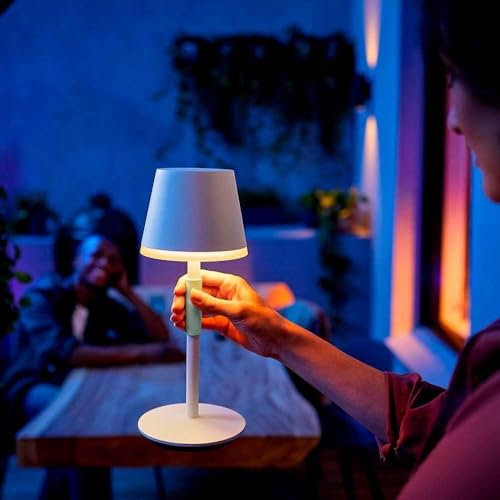
Check whether the recipient can adjust the light without reaching for a phone, whether the charging port is familiar, and whether the lamp remains stable where it will be used. A portable object also needs a place where it will naturally be returned for charging.
The device earns its place when the recipient can understand it almost immediately and use it even when Wi-Fi, an app, or an account is unavailable. More connectivity would not necessarily make the light more useful.
Comfort Technology Needs Consent, Fit, and an Easy Stop
An electric neck device may appear relaxing in an image, but comfort cannot be assumed from appearance or product claims. Body shape, preferred position, pressure, heat, noise, controls, and personal health considerations can change the experience completely.

Do not present a comfort device as treatment for pain or as an answer to a condition the recipient did not ask you to address. Check instructions, contraindications, heat settings, pressure controls, return terms, and whether the person is comfortable receiving something intended for the body.
In some relationships, asking first is more caring than protecting the surprise. The recipient can help identify what feels comfortable while the timing, note, and way the gift is presented remain personal.
Keep Notifications From Becoming Another Obligation
A reminder helps only when the recipient can decide which events deserve attention, how early alerts appear, and when the display becomes quiet.
Too many alerts make important information harder to notice and add another source of interruption.
The system works only when people know who adds information, who updates changes, and which calendar remains the source of truth.
A second schedule that is not maintained can create more disagreement than visibility.
An automated routine that needs frequent corrections, permissions, or troubleshooting may take longer than the original task.
Time is saved only after setup and maintenance are counted honestly.
A wall-mounted family calendar can place schedules, lists, and meal plans where several people can see them. It may help when the household already coordinates many activities and genuinely wants a shared digital system.
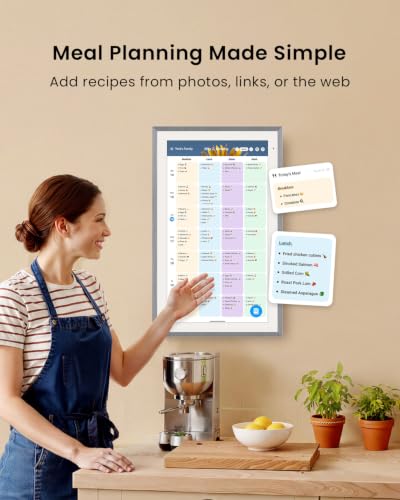
Before buying, ask which calendars the household already uses, whether everyone is willing to connect accounts, and who will keep the display accurate. Check subscriptions, recipe features, mobile access, privacy, mounting, power, and whether basic information remains available when the internet is interrupted.
Shared technology should support time together without pressure, not turn family coordination into constant reporting. A missed update or unanswered reminder should remain an ordinary human lapse, not evidence that someone is failing the system.
Make Sure the Device Is Still Useful Offline
Offline usefulness does not mean avoiding every connected product. It means understanding what remains when the connection fails.
Match the Device to the Person, Not Their Age
- Comfort with apps
Some people enjoy exploring settings while others prefer devices with visible controls and few menus.
Look forAn interface that matches the recipient’s actual habitsAvoidAssuming age predicts curiosity or ability - Vision, hearing, and control size
Text size, contrast, audio cues, button spacing, touch sensitivity, and remote design affect everyday use.
Look forControls the recipient can see, hear, and operate comfortablyAvoidRelying only on a marketing label such as easy or senior-friendly - Troubleshooting preference
A recipient may understand technology well but dislike spending leisure time repairing it.
Look forA product with understandable recovery stepsAvoidTreating technical support as part of the recipient’s hobby - Internet reliability
Connected features behave differently in homes with weak Wi-Fi, shared networks, mobile internet, or frequent outages.
Look forUseful functions that survive an interrupted connectionAvoidDevices that fail completely when cloud access is unavailable - Living arrangement
Roommates, family members, rental rules, shared accounts, and limited space can change what is appropriate.
Look forA device everyone affected is comfortable having in the homeAvoidAdding microphones, cameras, alarms, or wall installations without agreement - Existing routine
Technology is easier to adopt when it joins something the recipient already does in a familiar place.
Look forOne repeated task that becomes simplerAvoidA product that requires an entirely new habit to justify its presence
Do not assume an older adult needs simplified technology or that a younger person wants another connected device. Some parents manage complex systems confidently, while others of any age may prefer a physical button, printed instructions, or no app at all.
When considering thoughtful gifts for parents, examine the actual number of steps: opening the app, reading the screen, controlling volume, recovering an account, charging the device, and finding help when something changes. Respecting the person is more useful than designing the decision around age.
Stop when the recipient has rejected smart devices, does not want another account, has unreliable internet, already owns overlapping equipment, or would inherit an unwanted subscription. When they say they need nothing, do not treat technology as a clever way around the boundary.
A tech gift is also a poor fit when the giver mainly wants to try the product, demonstrate expertise, or redesign another person’s routine. The recipient should not have to learn a system merely to protect the giver’s feelings.
A paper planner, ordinary lamp, printed album, cable organizer, handwritten instructions, or an offer to help with an existing device may solve the real difficulty more gently. Choosing less technology is not a failure when it leaves daily life easier.
Frequently Asked Questions
How do I know whether someone will use a tech gift?
Look for a repeated problem the device clearly addresses and confirm that it fits the recipient’s current equipment and routine. A product that requires a new habit, account, or subscription needs stronger evidence than one that joins something they already do.
Should I ask what phone or computer they own?
Yes. Ask for the exact model and, when relevant, the operating-system version, ports, cases, accessories, and region. This practical question prevents many compatibility mistakes without removing the thoughtfulness of the gift.
Is a smart device a good gift for an older adult?
It can be when the device suits the individual’s interests, controls, home, internet, and desire to use it. Age alone does not reveal whether someone will enjoy or reject a connected product.
What should I check before buying an app-connected gift?
Check phone compatibility, account ownership, permissions, data storage, subscriptions, notification controls, regional availability, offline usefulness, and who will provide future support.
Are subscriptions acceptable as part of a gift?
Only when the recipient knows about the ongoing cost and wants the service. Pay for a clearly stated period and explain what happens when that period ends rather than leaving an automatic renewal attached to them.
Who should create the device account?
The recipient should normally own the primary account, recovery email, password, and stored information. The giver can assist during setup without retaining permanent administrative control.
What if the recipient needs help setting it up?
Offer a specific time to help and bring the model information, instructions, passwords, and required apps. Complete the transfer of ownership and leave simple written recovery steps rather than becoming the only person who can operate the device.
Is it better to give a gift card for technology?
A gift card can be thoughtful when fit, model, storage, color, operating system, or compatibility is highly personal. Explain what need you noticed while allowing the recipient to make the technical decision.
Give Technology a Small, Clear Job
- Solve a problem that already exists
- Confirm ecosystem and account compatibility
- Count setup and maintenance honestly
- Protect privacy and notification control
- Keep a simpler alternative available
A useful tech gift does not need to transform the recipient’s home or routine. It can charge familiar devices in one place, make family photographs easier to revisit, bring light to a useful corner, organize information people already share, or reduce part of a repeated household task. The gift succeeds when the technology becomes quieter over time and the useful part remains.